Product sheet · Datasheet · Page 1/12 · As of 10.2026
TASK MANAGEMENT WITH AI · SWITZERLAND
Operating Desk
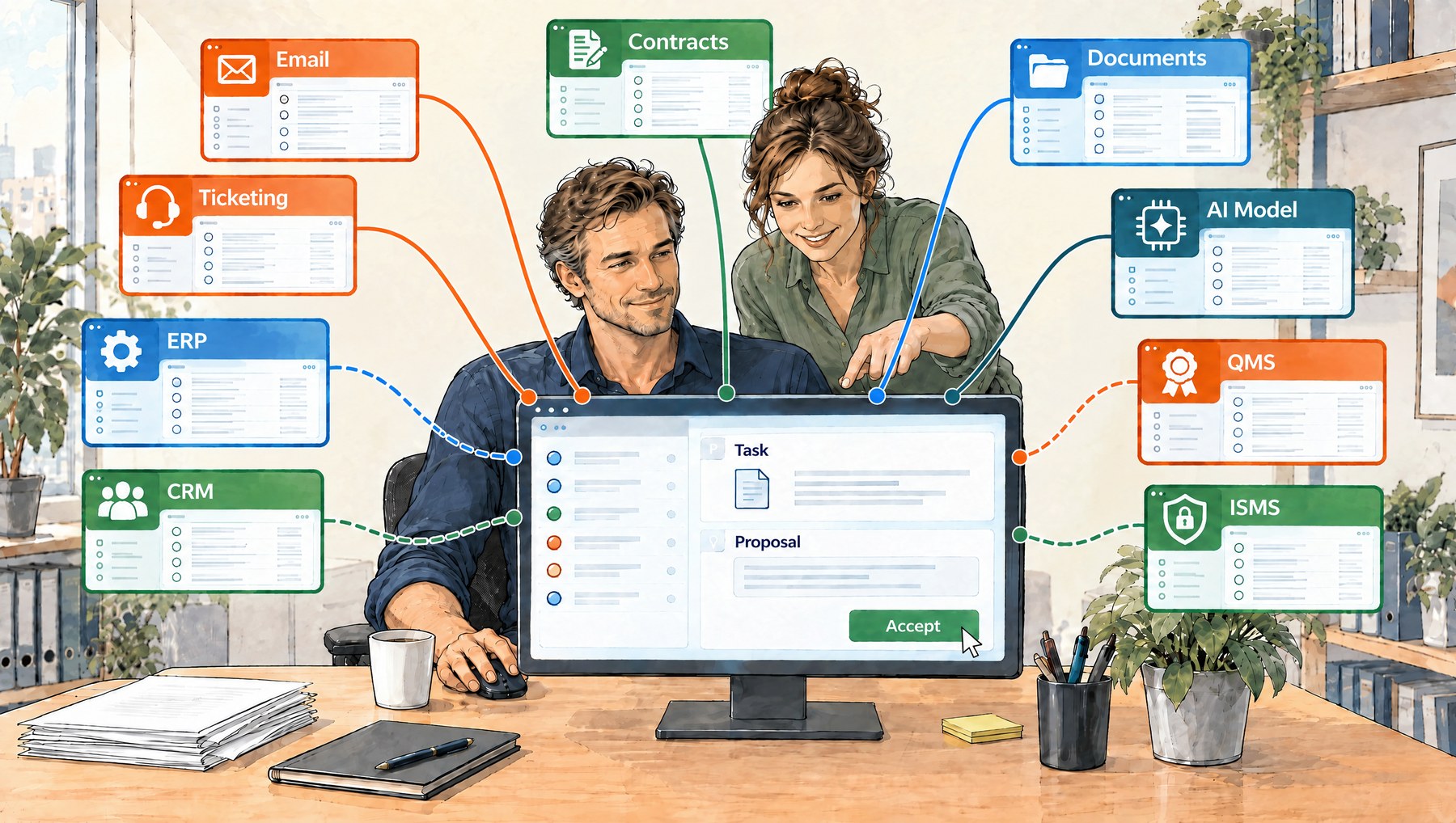
The Operating Desk runs the tasks of your business and connects the systems you already use: email, file storage, contract repository, CRM and ERP. Apart from task data and, if desired, the address book, the Desk works with the data in these systems. Nobody has to switch to another system for every task. AI prepares the work, your people review and decide.
Solid: available. Dashed: planned.
An inbox for all incoming items.Shared mailboxes and, on request, the «Desk» folder of a personal mailbox. Every message becomes a proposal for the responsible role. Items without an email, such as scanned post, are recorded by hand.
Tasks with a goal.Every task states what must be true once it is done. With role, person, deadline and the complete history.
Roles, handover, approval.Claim, assign or hand over to another role with a reason. Where approval is required, only the authorised role can close the task.
Filing in your file storage.Attachments and the original email go to the Desk's library in your file storage and stay with the task, also for the next person in charge.
Replies as drafts in the mailbox.AI proposes a reply. The Desk places it as a draft in the mailbox, and it is sent from your mail program.
Contracts with review dates.Contracts sit with the counterparty, with annexes and versions. AI pre-fills the contract fields from the PDF. The review date becomes a task in good time.
In test operation with real data at two Swiss businesses since October 2026.
What the Desk does for you
Less management by email. Responsibility, status and approval stay with the task. Internal forwarding and status requests fall away.
Your systems stay. Mail stays in the mail system, files in the file storage, accounting in the ERP. The Desk runs the tasks and keeps references to mail and files.
AI at defined points. AI proposes role, counterparty, goal and reply and, at the push of a button, puts together a plan. Responsibilities, deadlines, permissions and approvals are fixed rules in the code. Without AI, work continues by hand.
Your instance, your code. Instance hosted in Switzerland or on your own infrastructure. The language model is Claude by Anthropic, with a choice of Claude Opus 5.5 or Claude Sonnet 5.5; on request a model from OpenAI or a locally hosted one. On request, you receive the source code as a backup copy or as a basis for your own development.
Product sheet · Datasheet · Page 2/12 · As of 10.2026
How the Desk works
01
Incoming mail becomes a proposal.
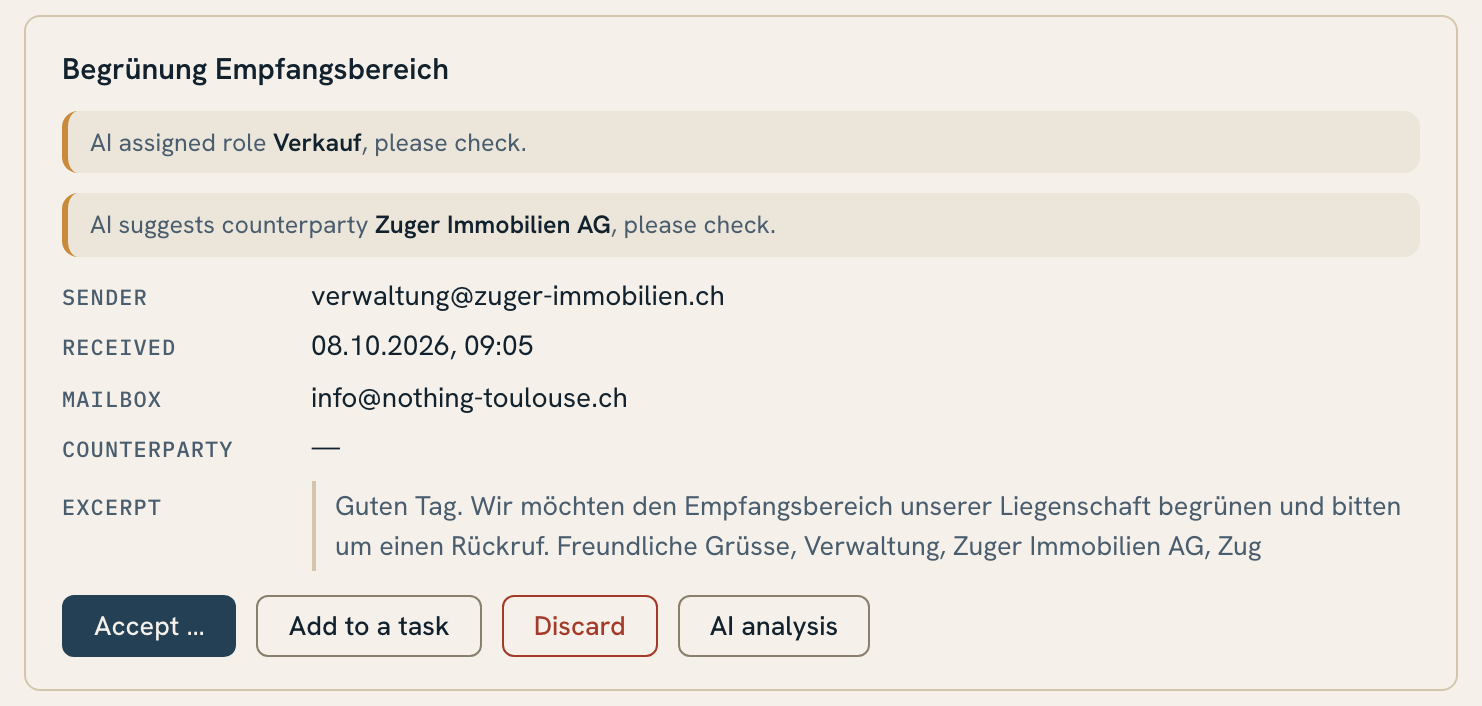
The Desk reads the approved mailboxes; items without an email, such as scanned post, are recorded in the Inbox by hand. When a message arrives, AI proposes the responsible role from the message text, plus the counterparty from the address book. If the counterparty is missing, AI proposes a new entry. At the push of a button («AI analysis») it also reads the attachments (PDF, Word, PowerPoint, text files), proposes the goal and puts together a plan.
Inbox: proposal with the AI's role and counterparty. Sample data.
Product sheet · Datasheet · Page 3/12 · As of 10.2026
02
Review and accept.
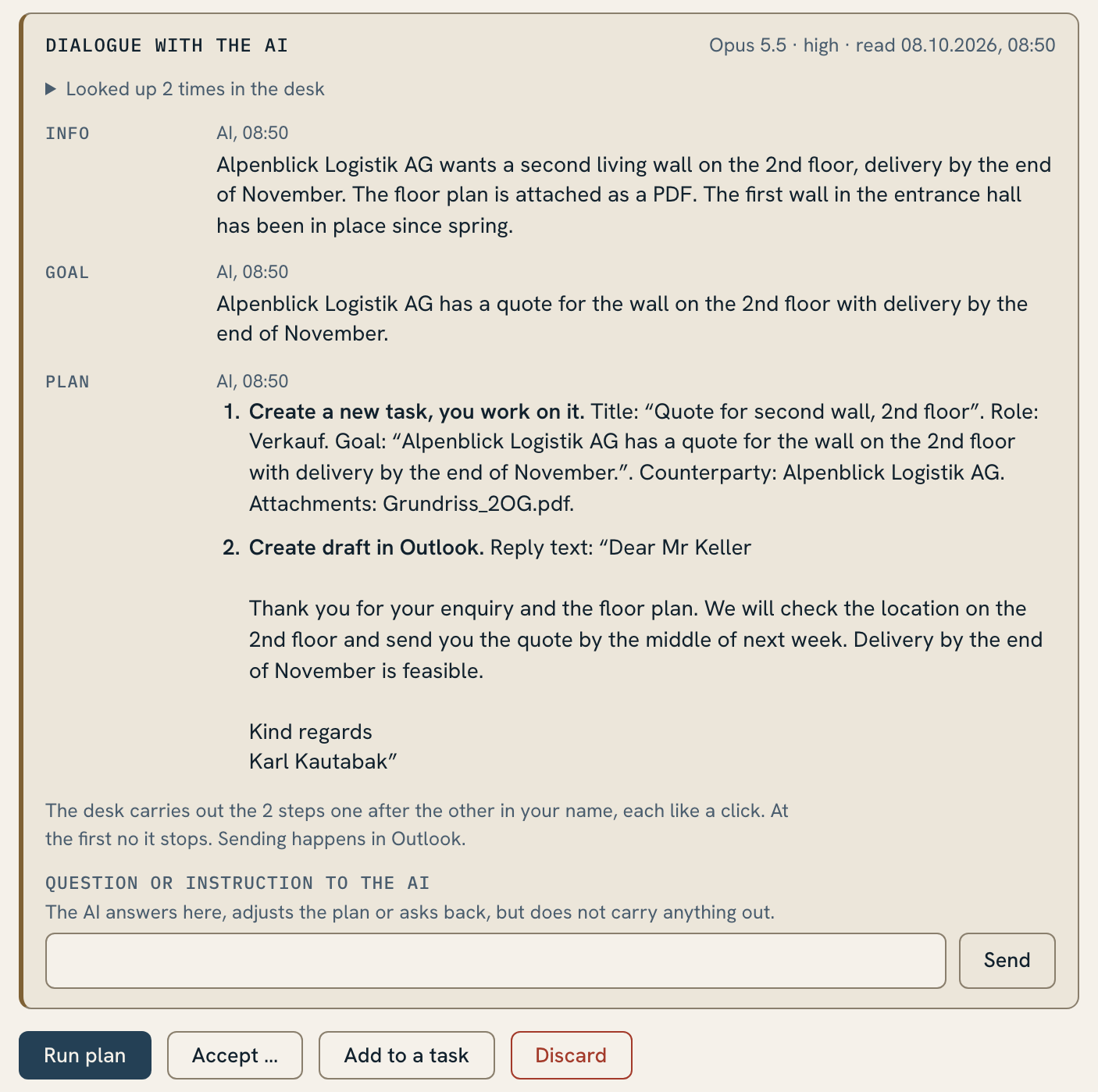
Whoever holds the role reviews the proposals and accepts, or reviews the AI's plan and runs it with one click. Selected attachments and the original email go to the Desk's library in your file storage. A follow-up message arrives as a new incoming item, and the Desk proposes the existing task. One click attaches it, and the person in charge sees «new mail». Tasks can also be created by hand.
The AI's plan, ready to review and run. Sample data.
Product sheet · Datasheet · Page 4/12 · As of 10.2026
03
Run it to completion.
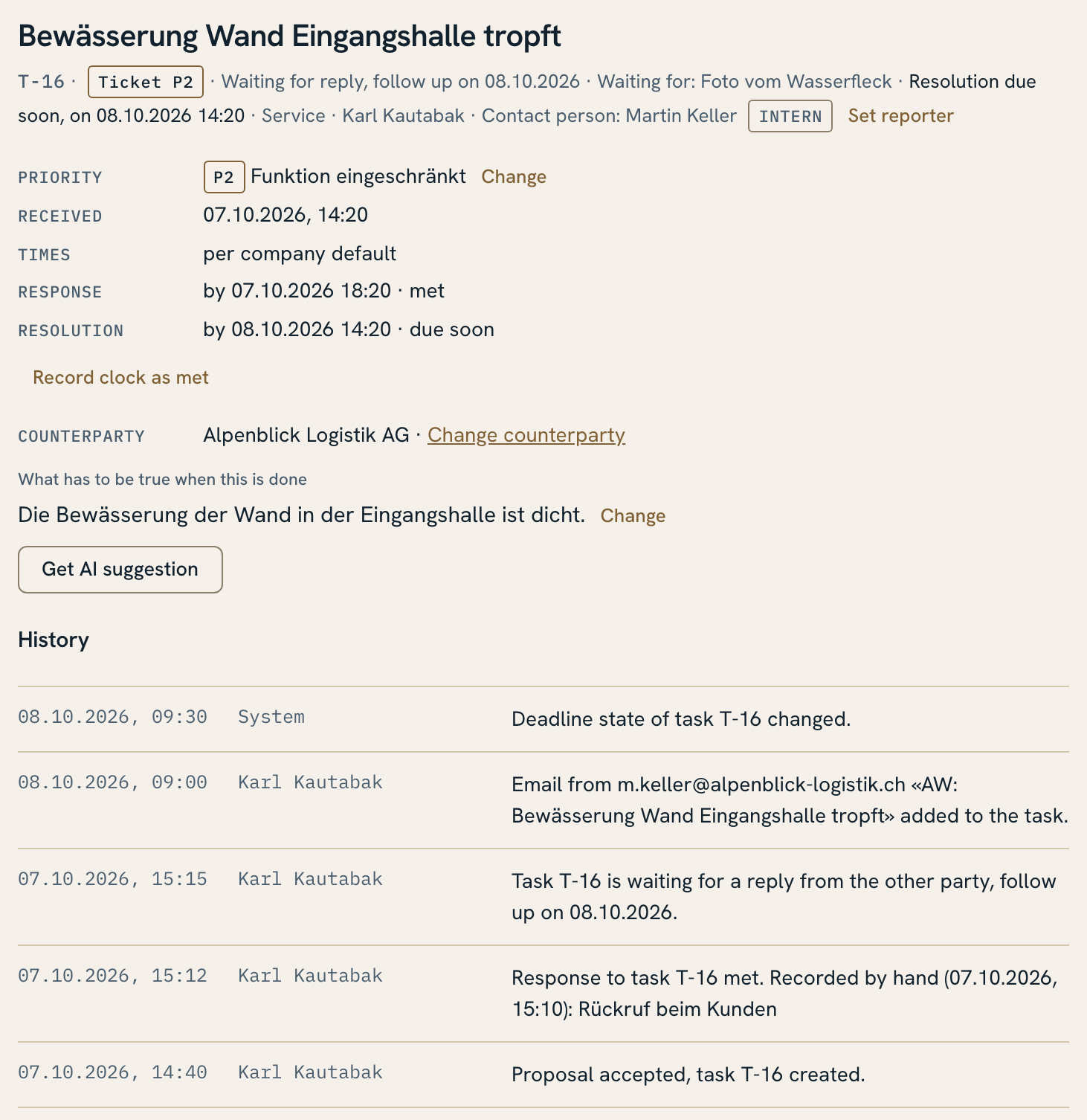
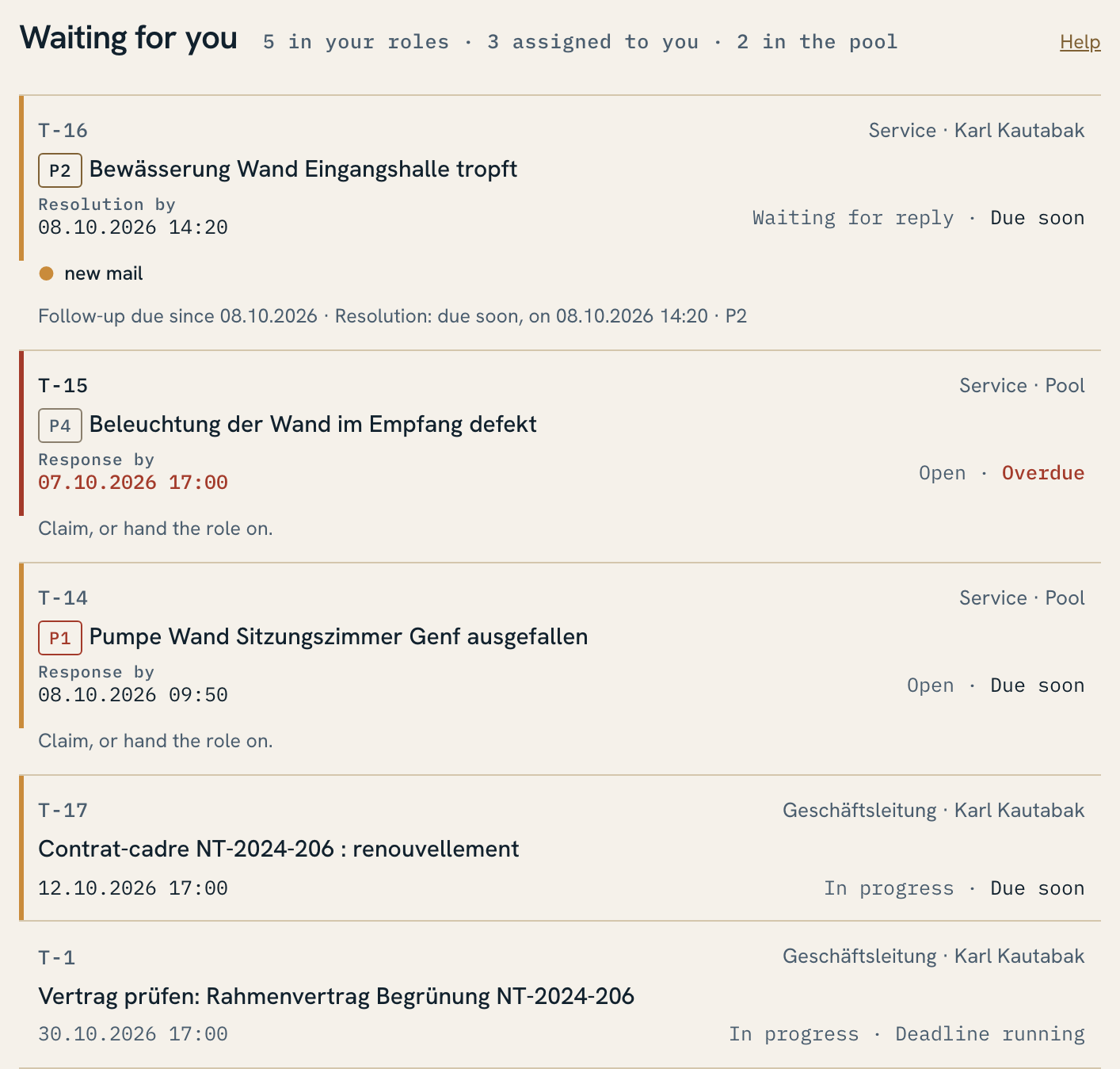
Claim, assign, hand over to a role. A task waiting for a reply carries a follow-up date. Deadlines show an early warning and when they are overdue. On completion, the Desk records whether the deadline was met. If approval is required, the task only counts as done once it is given.
Task with goal, responsibility, deadline and history. Excerpt, shortened. Sample data.
Product sheet · Datasheet · Page 7/12 · As of 10.2026
Tickets and reports
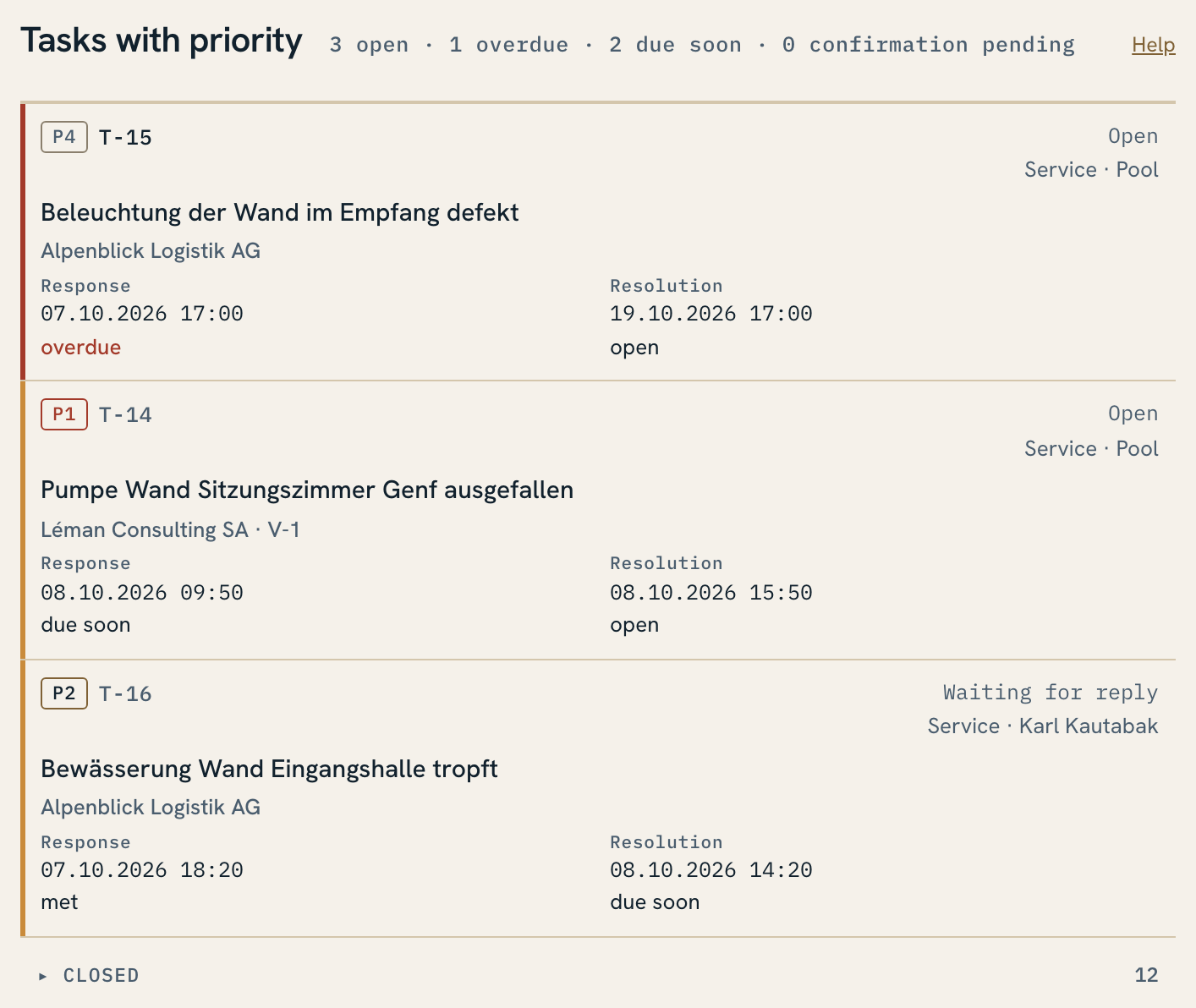
Tickets: a task with a priority (P1 to P4) becomes a ticket. The Desk calculates the due times for response and resolution, by company default or by contract, on request within service hours only. While the team waits for the customer, the resolution time can pause.
Tickets with priority, response and resolution times. Sample data.
Product sheet · Datasheet · Page 8/12 · As of 10.2026
Tickets and reports
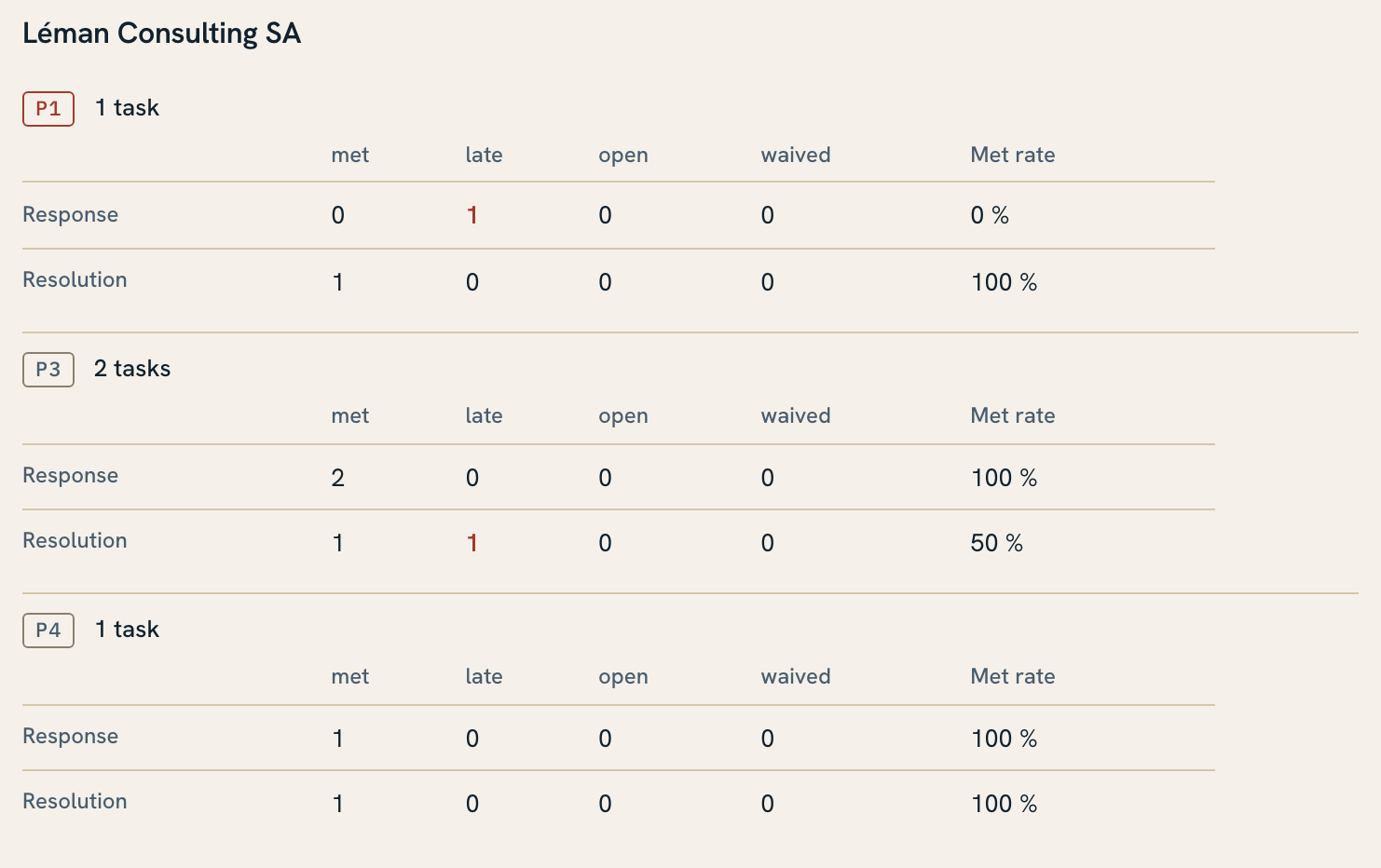
Reports: for a period, the Desk shows how many tickets met their response and resolution times, per customer and priority, and lists the late ones. Export to Excel: per ticket for internal work or as a report without title and description for passing on.
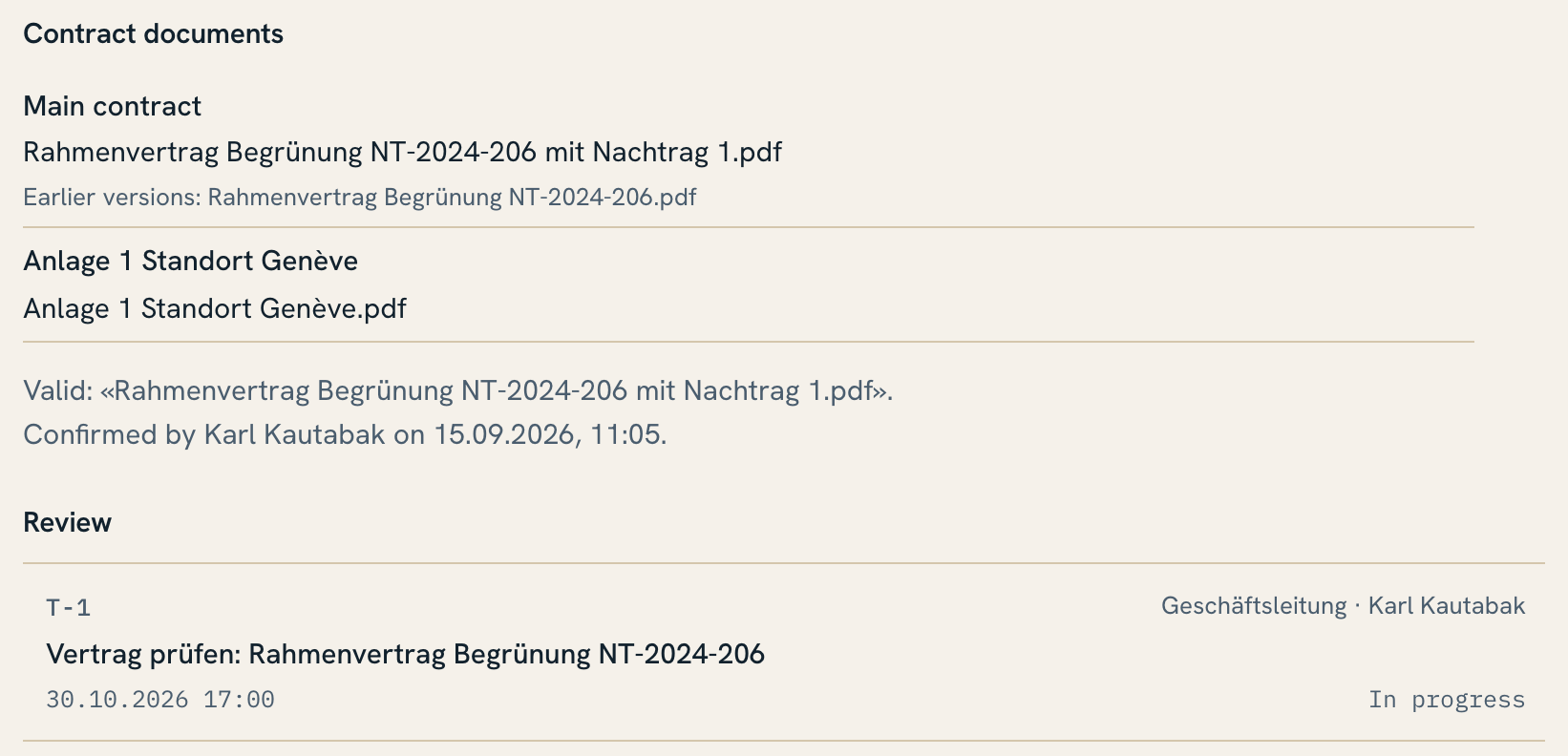
Reports: commitments met per customer and priority. Sample data.Contract with annexes, versions and review date. Excerpt, shortened. Sample data.
Product sheet · Datasheet · Page 9/12 · As of 10.2026
AI and fixed rules
What AI does: read and classify incoming mail, propose role, counterparty and goal, put together a plan at the push of a button and answer questions about it, draft replies, propose contract fields from the PDF, translate search requests.
What is fixed in the code: responsibilities, permissions, deadlines, handovers, approvals and the history. AI files nothing, sends nothing and assigns nothing. That happens when a person confirms.
Without AI: the Desk keeps running. Tasks are then recorded and classified by hand.
Costs in view: every model call is logged, the monthly cost is shown in the header.
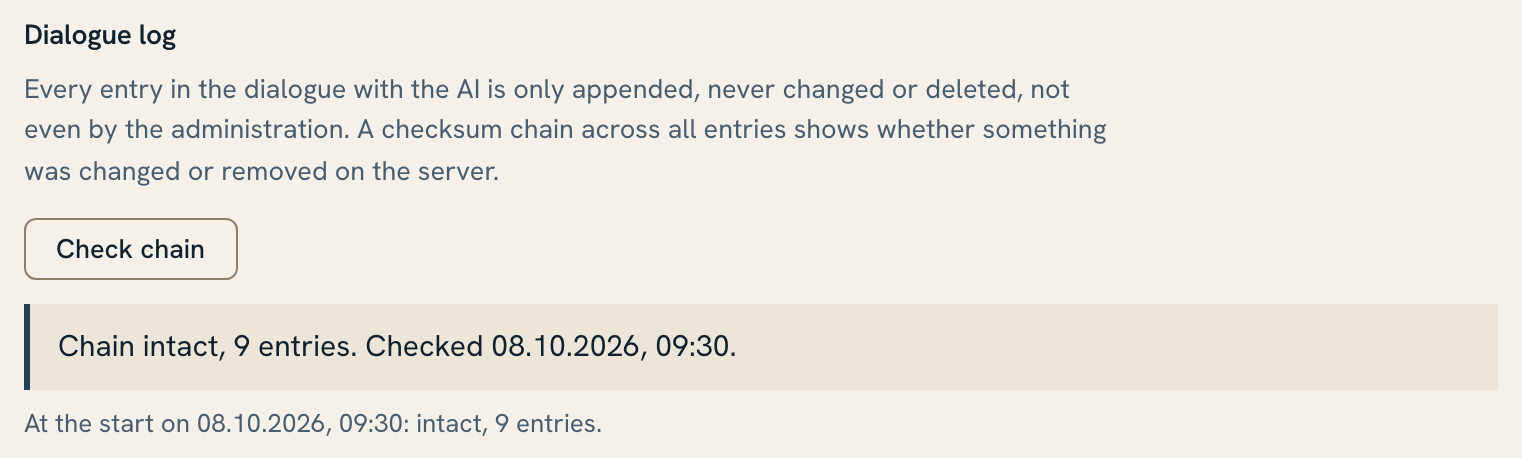
Traceable for audits: every action is recorded with person and time in the task's history; these entries are only ever appended, never changed or deleted. Every entry in the dialogue with AI is only ever appended, too. A checksum chain shows whether anything was changed or removed on the server.
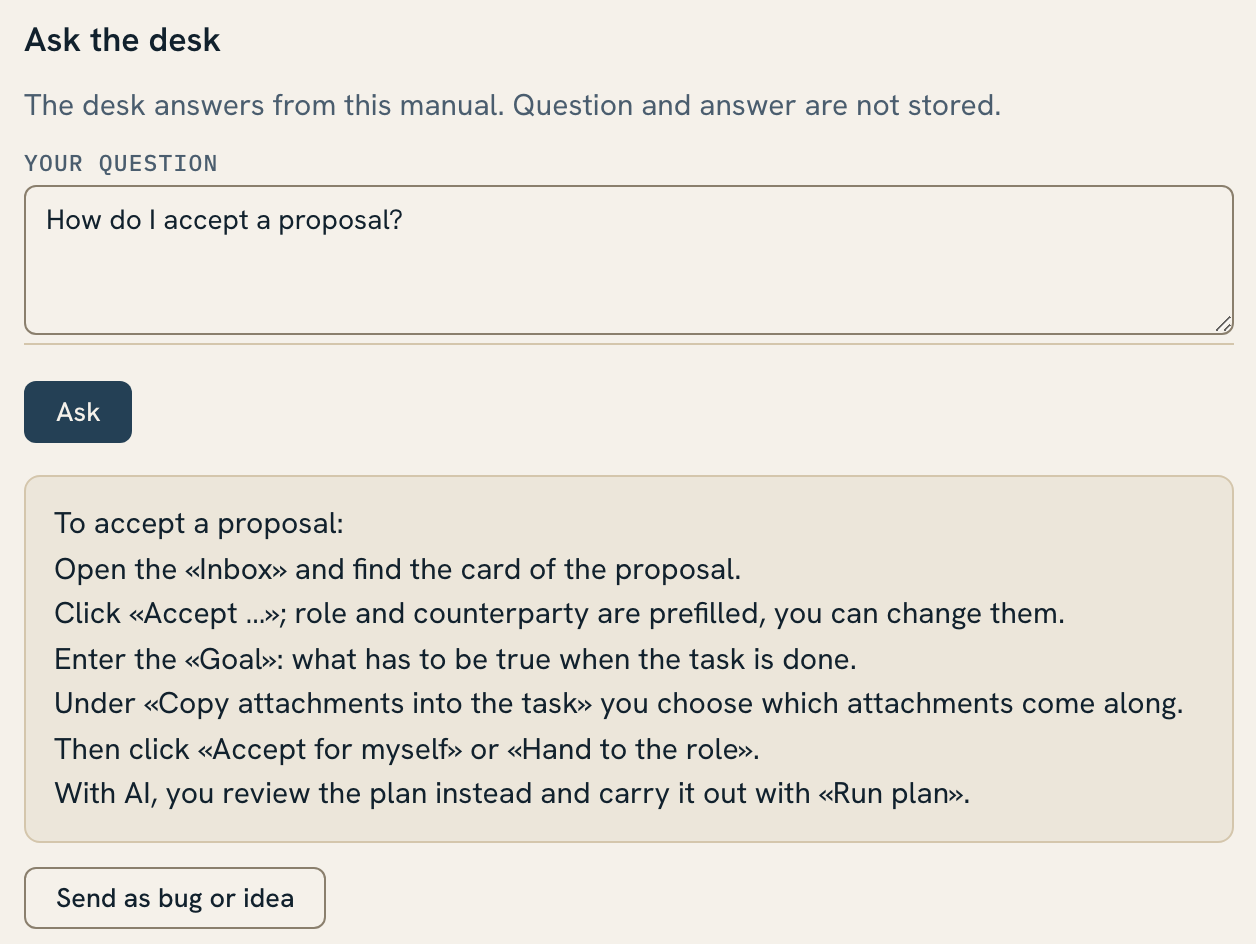
AI log with checksum chain. Sample data.«Ask the desk» answers questions about the manual. Sample data.
Product sheet · Datasheet · Page 10/12 · As of 10.2026
Integration and operation
Business systems
Business system
Systems
Reads
Writes
Sign-in
Microsoft Entra ID, on request Google and other single sign-on methods
sign-in with the company account
nothing
Email
Microsoft 365 (Exchange Online), on request Google Workspace
inbox of shared mailboxes; for personal mailboxes only the «Desk» folder; attachments
reply draft in the source mailbox (shared mailboxes); never sends
File storage
SharePoint, on request Google Drive
approved libraries and folders, search, preview
only the task library
CRM / ERP
bexio, on request CashCtrl and Abacus
contacts for the address book, with a preview before import
optional: new addresses, if the address book is kept there
Document management (optional)
on request, for example M-Files, DocuWare or ELO
documents and storage locations, search, preview
only the task library
Language model
Claude by Anthropic, on request OpenAI or a locally hosted open-weight model
proposals, plans and answers
nothing
Claude connection (MCP). Optional: an authorised person queries the Desk from their own Claude with their sign-in, for example for individual tasks or for related tasks that are not linked to each other. The Desk hands out mail and files only as references.
Data and operation
One isolated instance per business: one data set, one address book.
Hosted in Switzerland or as a container on your own infrastructure.
The Desk stores tasks, history, address book, contracts, references, reply texts and the AI log. Mail stays in the mailbox, files in the file storage.
For proposals, analyses and questions, message content, attachments and the necessary details from tasks, contracts and files go to the language model. With Claude, Anthropic processes this data; with a locally hosted model it stays in-house.
Automatic backups, checked before older backups are overwritten.
Address book: the business decides whether it is kept centrally in the Desk or in the CRM or ERP.
Administration in the interface: people, roles and permissions, mailboxes, storage locations, public holidays, end of business day.
Interface in German and English.
Further business systems are connected via a dedicated connector. Sign-in via Microsoft Entra ID, other single sign-on methods on request.
Scope. The Desk is not an ERP, not a CRM and not a second file store. Accounting stays in the ERP, files stay in the file storage, mail in the mail system. The Desk runs the work in between.
Product sheet · Datasheet · Page 11/12 · As of 10.2026
Frequently asked questions
We already have a DMS, a CRM and an ERP. Why do we need the Desk?
Because between the systems it stays unclear who has to act next, by when, and who notices when nothing happens. Today, emails, chats and personal follow-up bridge that gap. The Desk anchors this coordination in the task: with a goal, a responsible role, a deadline and a documented completion.
Does the Desk fit our systems?
Yes. The Desk is built like a computer with USB ports: the core with tasks, roles, deadlines and AI is in place, and the business systems are plugged in via connectors. Microsoft 365 and bexio are connected. For Google Drive, CashCtrl, Abacus or your DMS we build the matching connector, and the core stays the same.
Do we have to replace existing systems?
No. The business systems keep their jobs: documents stay in the DMS or the file storage, orders and vouchers in the ERP, customer relationships in the CRM. The Desk works with their data and itself keeps only the task data and, if desired, the address book. For specialist work the business systems remain the workplace; the VAT return still belongs in accounting.
What do our people gain?
Less searching, less double entry, fewer internal status emails. Responsibility, status and deadline stay with the task, and under «Waiting for you» each person sees their next action. Nobody has to switch to another system for every task.
What does management get out of it?
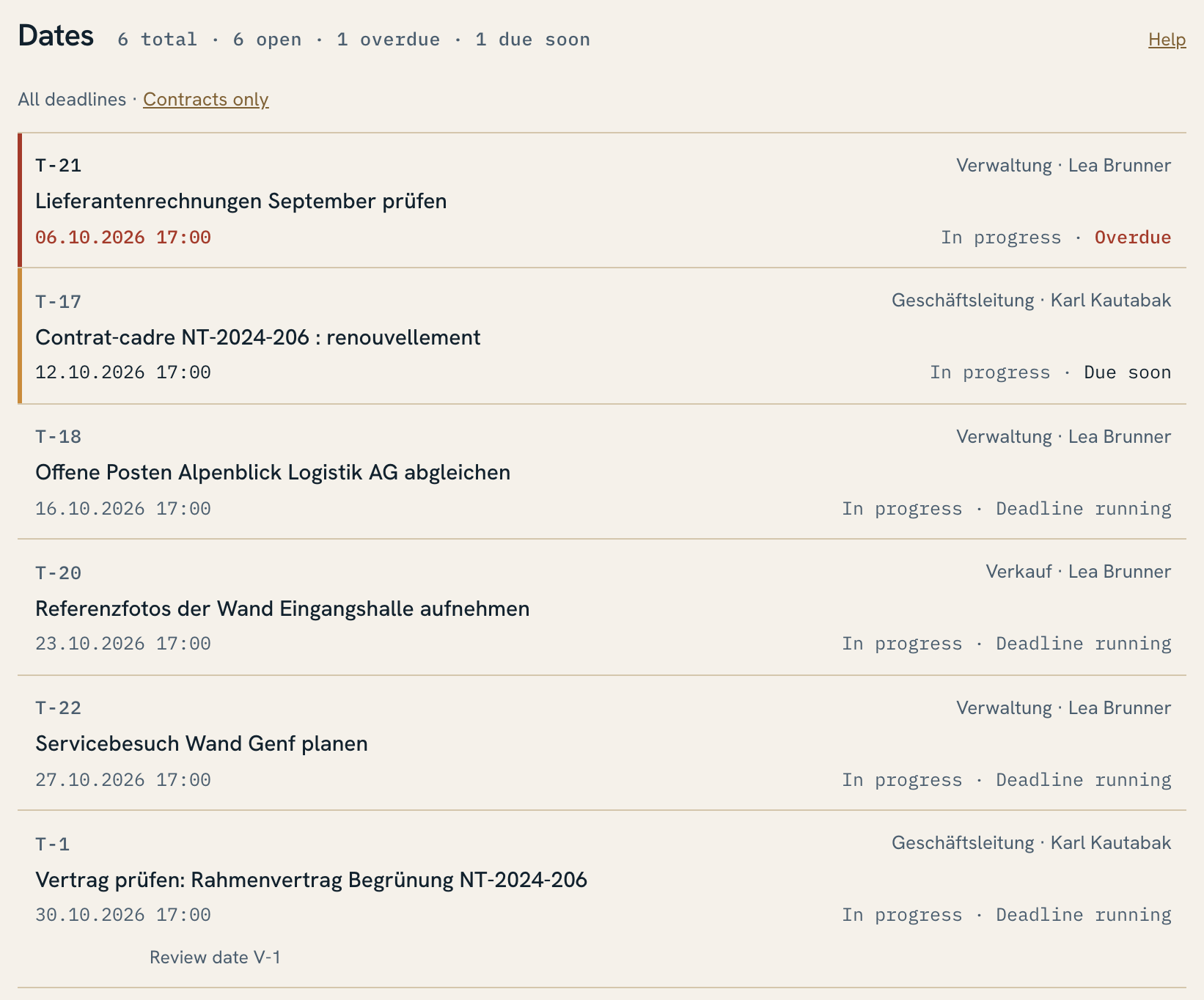
It sees which work is open, who carries it and where a decision is missing: in «Who carries what», in «Dates» and in the ticket reports. Status requests by email fall away.
Is the Desk another CRM or ERP?
No. Not an ERP, not a CRM, not a second file store. It runs task, responsibility and deadline and refers to documents and files in your systems.
Does AI decide for us?
No. It reads, classifies, proposes and drafts. The Desk marks its proposals with «please check». Filing, assigning, approving and sending stay with your people. A person runs an AI plan with one click in their own name.
Which language model does the Desk use?
Claude by Anthropic. In the interface you choose between Claude Opus 5.5 and Claude Sonnet 5.5. On request we switch to a model from OpenAI, another API provider or a locally hosted open-weight model; the effort is small. We recommend a frontier model, currently Claude Opus 5.5.
Where is our data?
The instance runs in Switzerland or on your premises. Mail stays in your mail system, files in your file storage. Whatever goes to the language model is processed by Anthropic for Claude, and by you yourself for a locally hosted model.
Does AI see more than I am allowed to see?
No. In the dialogue, AI reads files with the access of the person who is signed in. What someone may not open in the file storage, they do not get through an AI summary either.
Product sheet · Datasheet · Page 12/12 · As of 10.2026
Frequently asked questions
What happens if AI or a business system fails?
If AI fails, work continues by hand; rules, deadlines and history apply unchanged. If a business system fails, the Desk shows the error, and its data is missing until it is running again.
What happens if a transfer fails?
The error stays visible. The Desk never creates the same email twice. If a file fails when a proposal is accepted, the Desk says so, and the task stays created. «Run plan» stops at the first step that does not work.
Does the Desk read our personal mailboxes?
Only if one is entered in the configuration, and then only the «Desk» folder below the inbox. The person decides what goes there.
What do we have to settle before the introduction?
Which system leads for which information, for example whether the address book sits in the Desk or in the CRM. Plus the roles: who claims or covers a task, who changes deadlines and who approves. AI cannot turn conflicting data sets into a valid one either.
How does the introduction work?
We set up the instance, connect your business systems and enter mailboxes, storage locations and roles. Your team then works with real tasks.
Can we evidence our tasks in an audit?
Yes. Every action is recorded with person and time in the task's history; entries are only ever appended, never changed or deleted. Deadlines, handovers and approvals are recorded there, and a checksum chain additionally secures the AI log. The reports evidence response and resolution times met.
How does our team learn the Desk?
The manual is part of the Desk, in German and English, and every page leads to the matching chapter. «Ask the desk» answers questions about it with AI.
Do we get the source code?
On request, in two variants. As a backup copy for your business, updated twice a year; it is not intended for your own development. Or as a basis for your own development within your business, without resale. We support further development as a service on request.
Everything on your own premises
Can we run everything on our own premises, including the AI?
Yes. The Desk runs as a container on your own infrastructure, and on request it works with an open-weight model on your own servers. Then even the inference never leaves your premises. If mail and files are also kept in your own systems, all data stays with you. The quality of the proposals then depends on the chosen model.